Window Support Software

  • Subscribe to our RSS feed.
  • Twitter
  • StumbleUpon
  • Reddit
  • Facebook
  • Digg

Tuesday, 30 July 2013

How To Stop Windows Vista From Changing Desktop Icons Automatically

Posted on 04:21 by Unknown
Despite being one of the commonly used Windows operating systems across the globe, there are times when Windows Vista operating system starts showing up errors and glitches. Well, you cannot really come across any gadget or software that does not err. All that matters the most is what on earth you can do about it to get it fixed at the earliest.

When it comes to Windows Vista, there are a number of ways by which you can get back the operating system work at its peak performance. One of the common issues associated with the OS is that at times the size and the placement of desktop icons are changed automatically. As aforementioned, there are some easy and fast ways to get this fixed. Follow these simple guidelines from our Windows Vista help team to fix this issue.

Fixing Vista Problems
  • You can start out the process by clicking on the Windows Start menu located on the left side bottom corner of your computer screen. There is another way to access the Start menu and that is to press the Windows key on your computer keyboard.
  • Next up, you need to click on the icon that is labeled by Control Panel from the list of Start menu options. After that, in the Control Panel window, click on Folder Options followed by Show Hidden Folders and then press the OK button.
  • Now, you need to double click on the Users option and select your user name. Choose AppData and click on the option named Local.
  • Once you do that, you need to go through the list of applications until you locate the option named IconCache.db. Right-click on this, and select Delete and hit the OK button for confirming your choice. After that, you need to close down the window.
  • Following which, you need to right-click on the icon for Recycle Bin on the desktop and select Empty Recycle Bin and click on the OK button. When you delete the file from the Recycle Bin, it will be permanently removed from the corrupted icon files on your computer.
  • Lastly, you can finish off the process by restarting your computer. Doing so will make your Vista computer rebuild the icon cache.

So, that was some information to force your Windows Vista computer to stop changing the icons. For further information or if you unlikely get in to any issues while trying to perform the above steps, please feel free to get in touch with our Windows Vista help team.
Read More
Posted in Vista problems, Windows Vista help | No comments

Friday, 19 July 2013

Interact Intranet: Diagnosing problems with AD sync

Posted on 13:19 by Unknown
From time to time you might notice issues with accounts in your intranet not properly synchronizing with your AD system.  If this is the case the first step is to contact support which will give you the fastest resolution to your problem.

If you are handy with SQL and AD you can try to identify the issue yourself by examining the AD sync logs which are stored in a table called UMI_audit.

This query will return any errors from the last two weeks:
    select * from UMI_audit where errormsg is not null

The most common issues we encounter with AD sync are accounts that have been orphaned as a result of incorrect expiration.

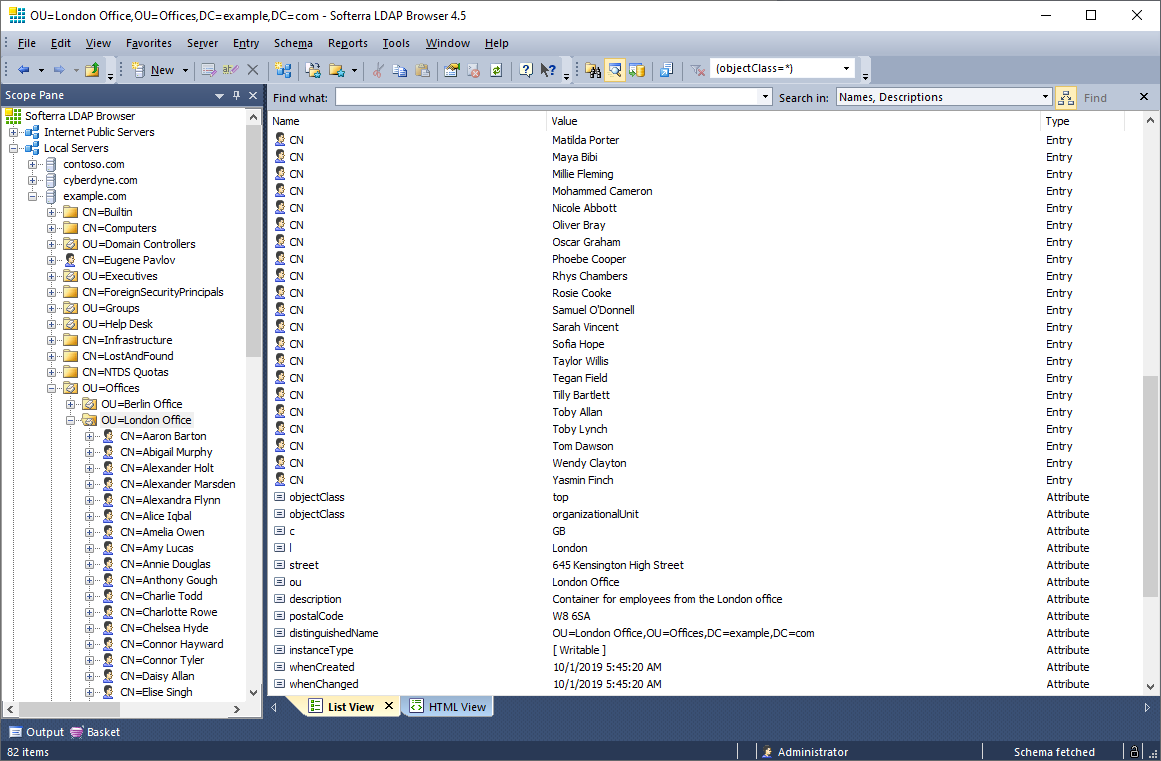
If your IT department isn't willing to give you AD access and you aren't sure how to verify data on the AD side, I'd recommend installing Softerra LDAP browser.  With a minute or two of configuration you'll have a READ only view into your organizations AD system.

Softerra LDAP Browser is a lightweight version of Softerra LDAP Administrator. It supports read-only operations that do not modify LDAP directory data, e.g. browsing, search, export, etc. For complete, fully functional management of LDAP directories you need Softerra LDAP Administrator.

Softerra LDAP Browser is the industry-leading software for browsing and analyzing LDAP directories. It provides a wide variety of features for handy viewing of directory contents, getting information about directory infrastructure and objects.

Right after the very first release Softerra LDAP Browser has become a real breakthrough in IT market thanks to its simplicity and power in equal measures. The software holds highest positions for 10 years already. Some of its features are unique - to date there is anything to match their efficiency in the existing LDAP software packages.

Read More
Posted in | No comments

Intranet, Portal, Social Network, Community vendor list

Posted on 07:56 by Unknown
In my opinion, the days when intranets were distinct from social networks is behind us.  Most intranet vendors these days include every social feature that social network vendors offer, and vice versa.    Similar to the transition half a dozen years ago when the term intranet consumed the notion of portals.

Below is a list of a few vendors that brand themselves as social, intranet, portal and community providers.  Feel free to email me or comment below if I'm missing anyone.

Acquia
Anahita
Atlassian - Confluence
Big Tent
Bloomfire
BlueWiki
BoonEx
BrightSpot
BuddyPress
Chatter
CommunityFire
CrowdVine
Elgg
Elgg Social
eXo
Fuze
Grou.ps
Groupiest
Grouply
GroupSite
IBM WebSphere
Igloo
INGage
Interact-Intranet
JCow
Jive Software
JomSocial
Kapow
Liferay
Lithium
MindTouch
Mixxt
MooSocial
MoxieSoft
Newsgator
Ning
Noodle
Oracle WebCenter
Orchid Software
Oxwall
PHPFox
Plone
Qlubb
SayMedia
ShareTronix
Social Go
SocialCast
SocialEngine
SocialText
Spurz
StatusNet
Telligent
ThoughtFarmer
Tibbr
Traction
Wall.FM
Webs
WSO2
Yammer
Read More
Posted in | No comments

Wednesday, 17 July 2013

Interact Intranet v5 Search Index Rebuild

Posted on 07:03 by Unknown
Each time we apply an update to our Interact v5 environment our search index jams and fails to index new content.  After 5-6 of these occurrences I've discovered the trick to rectify this issue which allows the search index to begin functioning in a normal manner again - it also indexes content that it had previously missed. 

While I don't recommend any customers use this process without first discussing with Interact, I'm posting the steps because of the frequency in which I need to refer to them:
  • Login to SQL and open the Interact db
  • Expand Storage
  • Expand Full Text Catalogs
  • Right click on Catalog1
  • Click Rebuild
The repair will take a few minutes depending upon the size of your index (we have roughly 10k items in our search index and the rebuild takes about 10 minutes).  While the index is being rebuilt nothing will be returned in your search results.

Read More
Posted in | No comments
Newer Posts Older Posts Home
Subscribe to: Comments (Atom)

Popular Posts

  • Deleting AutoComplete Entries In Outlook
    Your Outlook is not just a mere email client; it is a very efficient personal manager tool. MS Outlook can help you take notes, make journal...
  • Interact Intranet: Automate the Extraction of Binary Profile Pictures for use in Active Directory
    Active Directory can be used as a central repository for the storage of profile pictures.  This source can then feed email, CRM, intranets, ...
  • How to Set Password on Your Windows XP
    Windows XP is the most popular operating system in the world. It has got a number of unique features, which make it a favourite to all. It w...
  • Configure Windows Live Or Hotmail Account In Your IPhone
    IPhone lets you configure your email accounts in it, and now, if you have a Hotmail account, we will give you tips on how to configure that ...
  • Steps To Set Up The Email Filter In Outlook
    As we all know, Microsoft Outlook contains some of the most advanced and novel features which help users to remember and organize their impo...
  • Walk-through of domain configuration for Oracle WebCenter 11g: on Windows Server 2008 x64 & MS SQL 2008
    In my previous post I covered the third step of the "simple" installation topology, Install other Fusion Middleware products , and...
  • How To Tackle The Buffer Overflow Situation
    Normally a program runs on a sufficient amount of memory. However, when the program consumes more memory than required, a phenomenon called ...
  • Oracle WebCenter Interaction: Using multiple logins and URLs to access your portal
    When we purchased Plumtree licenses way back in the day we had visions of using the software to run our intranet and as an extranet for smal...
  • Walk-through of post install tasks for Oracle WebCenter: on Windows Server 2008 x64 & MS SQL 2008
    In my previous post I covered the fourth step of the "simple" installation topology, Configure domain for WebCenter , and will now...
  • Excel Tips & Tricks
    I enjoy spreadsheets and working with numbers.  A lot of this joy comes from the satisfaction of being able to keep track of many different ...

Categories

  • 64bit
  • access a help link
  • Active Directory
  • AD
  • Adaptive Layouts
  • Administrator account
  • Antimalware programs
  • binary
  • collaboration
  • content management
  • content migration
  • CSS
  • Data Connection
  • Data execution prevention
  • Ease your work
  • Eclipse
  • Email accounts
  • Email in Outlook
  • End process
  • Excel
  • hosting
  • iCalendar
  • ics
  • IIS
  • install
  • Interact-Intranet
  • Intranet
  • Jive Express
  • Jive SBS
  • Jive Software
  • Knowledge Directory
  • Liferay
  • Liferay Developer Studio
  • Linux
  • Local Computer Policy
  • login
  • Microsoft chat
  • Microsoft Help
  • Microsoft support
  • Microsoft tech support
  • Microsoft word application
  • Minimum hardware requirements
  • Mozilla Firefox web browser
  • MS SQL 2008
  • New Mail Notification
  • Oracle
  • Oracle ECM
  • Oracle Enterprise Content Management
  • Oracle OpenWorld
  • Oracle WebCenter
  • Oracle WebCenter Analytics
  • Oracle WebCenter Analytics 10.3.0.1
  • Oracle WebCenter Interaction
  • Oracle WebCenter Suite
  • Outlook 2007
  • Outlook Express Address Book
  • Outlook Repair
  • Outlook repair utility
  • Outlook settings
  • Outlook support
  • Outlook tech support
  • Password protection
  • Plumtree
  • portals
  • Programs and Features
  • Publisher
  • RCU
  • redirect
  • Remove AVG toolbar
  • Remove malwares
  • Screen Scraping
  • Search
  • set password
  • SharePoint
  • SQL
  • SQL Server Reporting Services
  • Studio
  • Task manager
  • try Windows 8
  • Underline feature
  • vanity URL
  • Vista problems
  • WCI
  • WebCenter Interaction
  • WebCenter Suite
  • WebLogic Server
  • Windows 7 Support
  • Windows 8 Support
  • Windows 8 transfer
  • Windows Blue
  • Windows Easy Transfer tool
  • Windows live chat support
  • Windows Live Photo Gallery
  • Windows Online Support
  • Windows Server 2008
  • Windows support
  • Windows Vista help
  • Windows XP support
  • WLS
  • Xbox 360 controller

Blog Archive

  • ▼  2013 (33)
    • ►  December (1)
    • ►  November (1)
    • ►  October (8)
    • ►  August (2)
    • ▼  July (4)
      • How To Stop Windows Vista From Changing Desktop Ic...
      • Interact Intranet: Diagnosing problems with AD sync
      • Intranet, Portal, Social Network, Community vendor...
      • Interact Intranet v5 Search Index Rebuild
    • ►  June (4)
    • ►  May (3)
    • ►  April (2)
    • ►  March (2)
    • ►  February (1)
    • ►  January (5)
  • ►  2012 (32)
    • ►  December (4)
    • ►  November (5)
    • ►  October (2)
    • ►  September (7)
    • ►  August (1)
    • ►  July (1)
    • ►  June (8)
    • ►  May (2)
    • ►  April (1)
    • ►  March (1)
  • ►  2011 (30)
    • ►  November (3)
    • ►  October (2)
    • ►  September (2)
    • ►  August (4)
    • ►  July (3)
    • ►  June (5)
    • ►  May (4)
    • ►  April (2)
    • ►  March (3)
    • ►  January (2)
  • ►  2010 (8)
    • ►  December (2)
    • ►  November (1)
    • ►  October (5)
Powered by Blogger.

About Me

Unknown
View my complete profile